WPForms Lite is a free drag-and-drop WordPress form builder for contact requests and basic payments. It relies on email for standard submissions; paid plans unlock local entry management and advanced workflows.
For a basic contact form, I would start with WPForms Lite, then submit test enquiries from a phone and confirm delivery to a monitored inbox. Its biggest drawback is not form design: it is what happens after someone presses Submit. If missing or unsearchable leads would hurt the business, paid entry management may justify Basic. Upgrade to Pro for serious payment workflows or integrations only when the actual feature set and avoided 3% fee outweigh the annual license. Do not buy a higher tier just because a template preview says Pro.
Why this rating?
WPForms Lite offers an approachable route to basic contact forms, but its value falls when searchable entry handling or more advanced workflows are essential. Delivery, data recovery and paid-feature boundaries matter more than the template preview for a business that cannot afford missed leads.
Research & assessment details
Documentation-based assessment by WPToolWatch Editorial. No hands-on benchmark.
WPForms Lite is a sensible starting point for a contact page, lead enquiry or small payment form. You can build and embed forms without a paid license, and the visual editor is easier for non-developers to maintain than custom PHP. But the useful purchase decision starts with what happens to a submitted message, not how quickly the form looks finished.
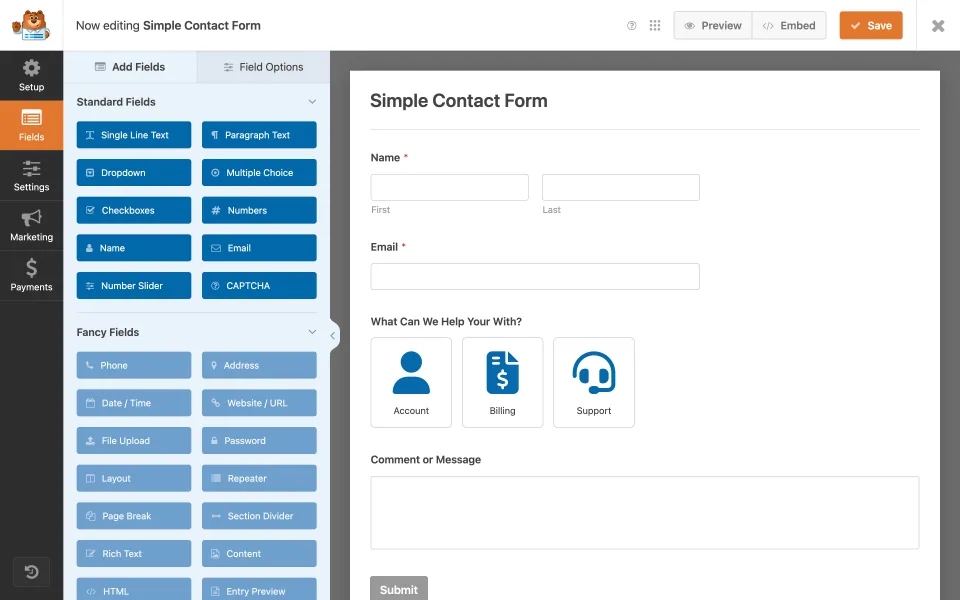
A simple contact-form preview illustrates Lite’s core use case: arranging fields and configuring a basic submission workflow.
The critical catch: where submissions go
Lite normally emails notifications rather than saving a searchable local entry inbox in WordPress. If a lead email is filtered, misconfigured or never delivered, the dashboard cannot simply produce the missing entry. Test a real submission to a monitored address and confirm SMTP or authenticated delivery as needed. This limitation makes an otherwise free contact form unsuitable for some lead-critical businesses.
The builder defines the form, but notification delivery is a separate step. Submit a real test and verify that the destination mailbox receives it.
Lite Connect is a backup option, not a free entries dashboard
Lite Connect can send encrypted copies of new form submissions to WPForms cloud infrastructure once enabled. You can recover those entries in the WordPress dashboard after upgrading to a paid license, but the vendor states a one-year retention period. Earlier submissions are not retroactively collected. Assess data residency, privacy notices and your ability to recover data before using the service for sensitive enquiries.
Free payment forms still have a transaction cost
Lite can process Stripe and supported PayPal payments, including certain recurring subscriptions. That makes the free plugin more capable than a contact-form-only description suggests. However, the vendor charges an extra 3% on qualifying Lite transactions on top of gateway fees; Basic and Plus also remain subject to payment surcharges in current plan materials. Pro and Elite remove the extra WPForms platform fee while active. The cheapest total cost depends on payment volume, not just license price.
When Basic, Plus or Pro is worth paying for
Basic can justify itself when the website needs stored entries, exports, conditional fields or file uploads rather than relying only on email. Plus adds site capacity and email marketing integrations for a small portfolio. Pro is a stronger fit when workflows depend on advanced payment conditions, surveys, higher-end add-ons, or enough transactions to make the 3% platform fee costly. Elite primarily makes sense for agencies and projects needing high-end CRM/webhook integrations and larger license coverage.
These advanced workflow examples belong in the paid-edition evaluation. They should not be read as a list of features included with Lite.
Spam protection and notification delivery require real tests
The plugin includes spam protection and offers reCAPTCHA, hCaptcha and Cloudflare Turnstile connections in Lite. No filter prevents every abuse case. Test phone layout, required fields, error messages, spam handling and destination mailboxes with the actual hosting stack. A form reporting success while the business inbox never receives the message is not a successful deployment.
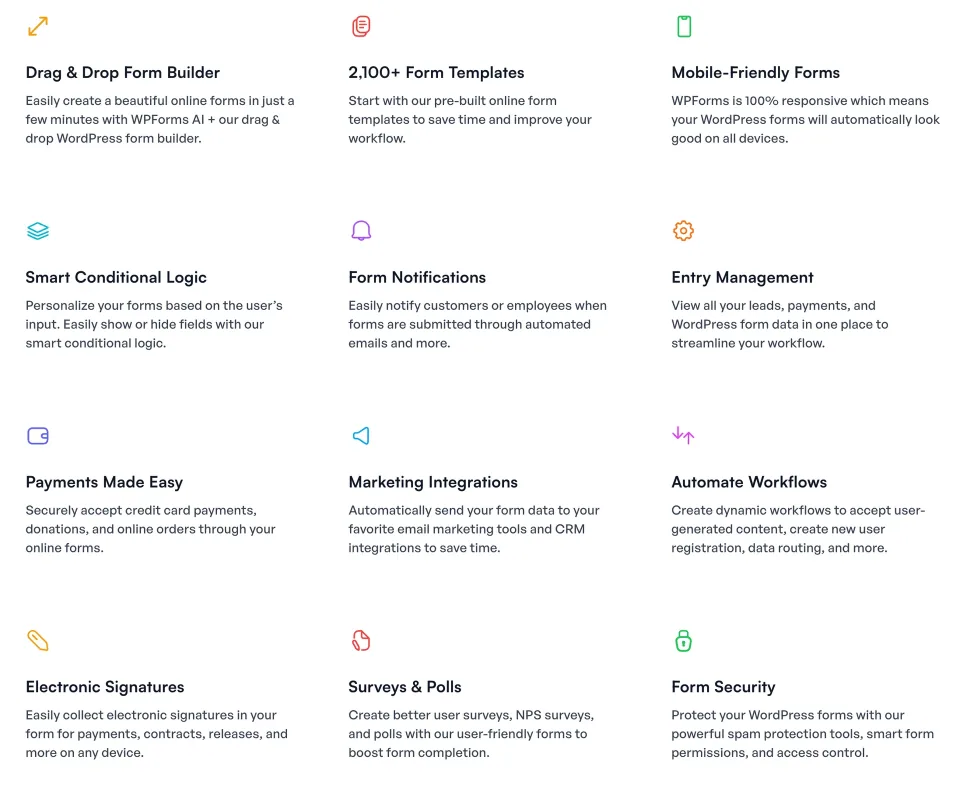
Use the feature overview as a test checklist for the configured form, especially validation, spam protection and notification delivery.
What the annual plan price really means
The official WPForms table advertises first-year discounts on Basic, Plus, Pro and Elite, but its renewal terms return to full list price. That difference matters after year one, especially across several sites. A canceled or expired paid subscription can affect premium updates, integrations and support even if some existing forms and entries remain accessible. Compare actual feature requirements and renewal totals before committing.
Compatibility snapshot and decision
The WPForms Lite 2.0.4 release is listed in early November 2026, with a WordPress 5.5 and PHP 7.2 minimum in its plugin header. Those values are release metadata, not proof that every builder, CAPTCHA or payment stack will work without issue. For a small website I would start with Lite, run submission and delivery tests, and upgrade when a defined workflow—not a sales prompt—demands it.
Advanced payment workflows and supported conditional payment logic
Stripe Pro, Square Pro and PayPal Commerce capabilities
Surveys, reports and additional marketing/automation features
Five-site entitlement and priority support
License & support
Annual paid WPForms license
Renewal
First-year introductory price $199.50. Regular renewal list price $399/year; active Pro removes the additional WPForms 3% platform fee, but not gateway charges.
Prices checked on 2026-11-09 against WPForms official USD pricing. Basic/Plus/Pro/Elite are paid upgrades to the WPForms ecosystem; the main product profiled here remains WPForms Lite. Paid prices shown are advertised first-year 50%-off promotions, billed annually: $49.50/$99.50/$199.50/$299.50. The listed normal renewal amounts are $99/$199/$399/$599 per year respectively. Taxes, offer eligibility and checkout totals may differ. Lite/Basic/Plus can incur a 3% WPForms payment platform fee on qualifying payments, in addition to processor charges; an active Pro/Elite license removes that additional WPForms fee per current vendor documentation. Subscriptions default to annual auto-renewal; cancellation is distinct from license expiration.
Some links are affiliate links. We may earn a commission.
Listed prices may exclude taxes. Promotions and vendor terms can change; confirm at checkout.
AT A GLANCE
Key features
01
Free drag-and-drop forms for enquiries, basic lead capture and payments
02
Lite submissions depend on email; optional cloud backups are time-limited
03
Stripe and PayPal work in Lite, with an extra 3% WPForms fee
04
Paid plans add entry management, logic, integrations and bigger site allowances
Features & compatibility
Vendor-sourced facts are based on published documentation; exceptions are labelled. Sources and check dates are grouped below each section.
WPForms Lite: free GPL v2-or-later plugin. Paid Basic, Plus, Pro and Elite: separately billed annual subscriptions with different site limits and access terms.
Support channel
WordPress.org community support for Lite; paid plan support subject to active subscription and tier
Small WordPress sites that need a straightforward contact, quote-request or simple payment form without an initial plugin bill; owners willing to test email delivery and manage Lite entry-backup choices.
Consider alternatives if
Teams that need a local searchable submission inbox, file uploads, conditional fields or reliable multi-person lead workflows while remaining entirely on Lite; sites that need advanced payment logic or cannot accept a platform surcharge.
BEFORE YOU DECIDE
Frequently asked questions
Is WPForms Lite genuinely free?
Yes. WPForms Lite can be installed from WordPress.org and used without a license fee. Hosting, email-delivery services, external payment-processing charges and paid upgrades are separate costs.
Does WPForms Lite store contact form submissions in WordPress?
Not as ordinary searchable entries in the WordPress database. Lite normally emails submission notifications. Any critical lead workflow should test delivery and consider whether paid entry management is needed.
Can I recover missed messages with Lite Connect?
Only if Lite Connect backups were enabled when the submissions arrived. It stores new entries on WPForms servers for up to one year; restoring them to the WordPress dashboard requires a paid WPForms upgrade. It cannot recover earlier unbacked submissions.
Can WPForms Lite accept Stripe payments?
Yes. The vendor documents one-time and recurring Stripe payments in Lite. Live payments require HTTPS and a connected Stripe account. Lite adds a 3% WPForms fee to each transaction in addition to Stripe fees.
Does WPForms Lite support PayPal?
Yes, PayPal Commerce works in Lite for supported payment forms. WPForms adds a 3% platform fee on Lite transactions in addition to the payment processor’s fees. Payment rules are more restricted than with Pro.
How do I avoid the extra 3% WPForms payment fee?
According to the current vendor pricing and Stripe documentation, an active WPForms Pro or Elite license removes the additional WPForms platform fee. Processor fees still apply. Compare annual license cost with your expected payment volume.
Is conditional logic available in the free edition?
No. Conditional form fields are available from Basic upward, while conditional payment routing requires Pro and the appropriate payment addon. Verify the exact integration at checkout.
What do Basic, Plus, Pro and Elite add?
Basic adds entry management, conditional logic and other advanced fields for one site. Plus expands to three sites and more marketing integrations. Pro supports five sites with advanced payment tools, surveys and automation. Elite targets higher-end integrations and unlimited sites, subject to license terms.
Are file uploads available in WPForms Lite?
The vendor lists file upload fields among paid capabilities, not the ordinary Lite feature set. Check the relevant paid tier before buying for document intake.
What happens if notification emails do not arrive?
Test whether submissions succeed and whether the destination mailbox receives the notice. Sender-domain authentication or SMTP/mailer configuration may be required; WPForms itself does not guarantee email deliverability.
Does WPForms Lite include spam protection?
It provides built-in anti-spam options and integrates with reCAPTCHA, hCaptcha and Cloudflare Turnstile. Those tools reduce automated abuse but do not replace monitoring, rate controls and consent/privacy decisions.
What are the current WordPress and PHP requirements?
The WordPress plugin release headers for WPForms Lite 2.0.4 list WordPress 5.5+ and PHP 7.2+. Check the current directory release before an actual update and test against your installed theme and other plugins.
Do WPForms annual subscriptions renew at the discounted first-year price?
Not under the current advertised offer. The pricing page labels the lower amounts introductory and says renewals are at full price. Verify the amount shown at checkout and renewal date in your account.
What happens if a paid WPForms license expires?
The vendor says the license holder can continue accessing existing forms and entries, but premium updates, integrations and support are no longer assured. Do not assume an expired license is suitable for critical payment or lead workflows.
Is WPForms Lite the same product as WPForms Pro?
No. This profile covers the free WPForms Lite plugin. Basic, Plus, Pro and Elite are paid license tiers of the broader WPForms ecosystem; their features should not be attributed to Lite.
A paid WordPress form builder for conditional and multi-step forms. Quform offers one-time licensing, but email delivery and submission handling need proper setup.
WordPress form builder with generous free tools, including conditional logic and Stripe. Pro adds uploads, multi-step forms and advanced workflows; choosing a license is mostly about features needed and site count.
Paid WordPress form builder for conditional forms, uploads and repeatable data collection. Basic handles core forms; Pro adds payment and automation add-ons; Elite covers Multisite and advanced add-ons.