Flatsome is a sensible fit when your recurring work is changing existing banners, updating promotional sections, or building simple campaign pages in UX Builder. Those tasks can often be handled without code after a clear handoff. It is not a promise of developer-free ownership: new product templates, WooCommerce integrations, checkout problems, and unexplained builder failures are different types of work. Best for owners prepared to learn where each piece of content lives; less suitable if you expect every part of WooCommerce to be edited through one visual canvas.
Flatsome by UX Themes is a WordPress and WooCommerce theme with its own UX Builder and reusable UX Blocks. This review judges how practical it is for a non-developer owner to handle ordinary store updates—not its performance in an unperformed speed test.
What can you change without code?
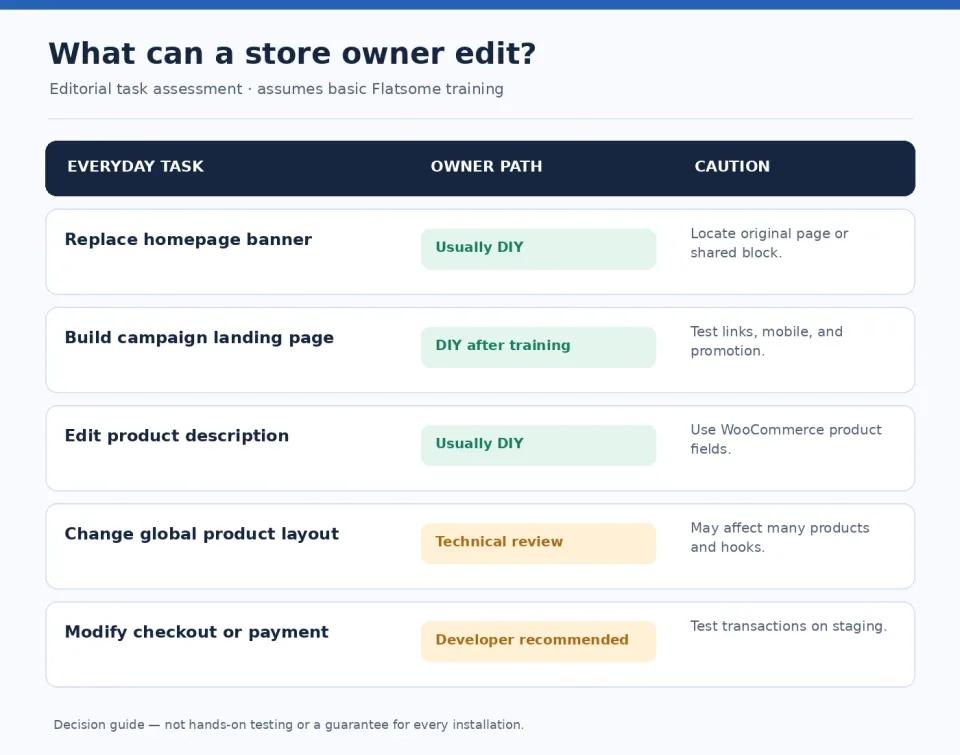
Editorial matrix categorizing routine Flatsome updates and when technical review may be needed
“Edit the store” can mean at least three things: replacing content inside an existing layout, changing the layout itself, or changing how the store behaves. These require different levels of expertise. The table-like task assessment below is editorial guidance inferred from the documented workflow, not a lab test or a guarantee for every installation.
Change a homepage promotion or banner
Usually a good self-service candidate when the banner is already part of an editable UX Builder page or a known UX Block. The practical difficulty is locating the correct source: a homepage banner might live in the page, a reused block, or a shop-header setting. Replace the image and text, preview the result, and check desktop and mobile before publishing.
Build a seasonal landing page
A reasonable owner task after initial training. UX Builder provides visual editing, and Flatsome Studio lets editors import layouts where UX Builder is supported. Imported layouts still need store-specific imagery, accessible headings, accurate offers, mobile review, and links that lead to the correct product or category.
These are typically WooCommerce product-data tasks rather than UX Builder template edits. A store owner should know which fields alter the individual product and which control presentation across the catalog. Treat prices, tax presentation, variations, and stock as operational changes that deserve checking on the live product page.
Change a product-page layout
This requires greater care. UX Themes documents custom product blocks at global, category, and individual-product levels. A change to the global layout can affect many products. The documentation also warns that plugin-generated WooCommerce hook content may need manual placement in custom layouts.
Escalate when the task alters payment methods, checkout logic, custom hooks, plugin integration, or a broken purchase flow. Being able to drag elements around a page does not establish that transactions and integrations will continue working.
Why the UX Builder learning curve depends on the site you inherit
Original illustration of a store owner editing a WooCommerce homepage on a laptop
Flatsome groups visual page editing around UX Builder, but stores can also use WordPress product fields, theme options, UX Blocks, menu settings, and third-party plugins. A good handoff is therefore a map of content ownership, not merely a 20-minute lesson on dragging blocks.
UX Blocks: convenient reuse with a wider blast radius
A shared block is useful when the same promotional message appears in multiple locations. But an owner needs to know whether an edit affects one page or every instance of that block. For example, UX Themes’ shop-header instructions create a UX Block and insert its shortcode under Advanced → WooCommerce. That documentation was updated December 4, 2020, so verify the menu labels against your installed version.
Studio imports are a starting point, not a finished campaign
Flatsome Studio can help assemble a layout faster, according to the vendor documentation (last updated December 18, 2020). It does not verify your promotions, copy, inventory, mobile hierarchy, consent notices, or analytics. Those are editorial and operational responsibilities.
A useful five-minute handoff test
Ask the agency to show you three tasks on a staging copy: change a homepage banner, edit a product description, and update a reusable promotion block. Then repeat them yourself without directions. Record where each edit lives and how to undo it. This is a proposed evaluation method, not a test WPToolWatch performed.
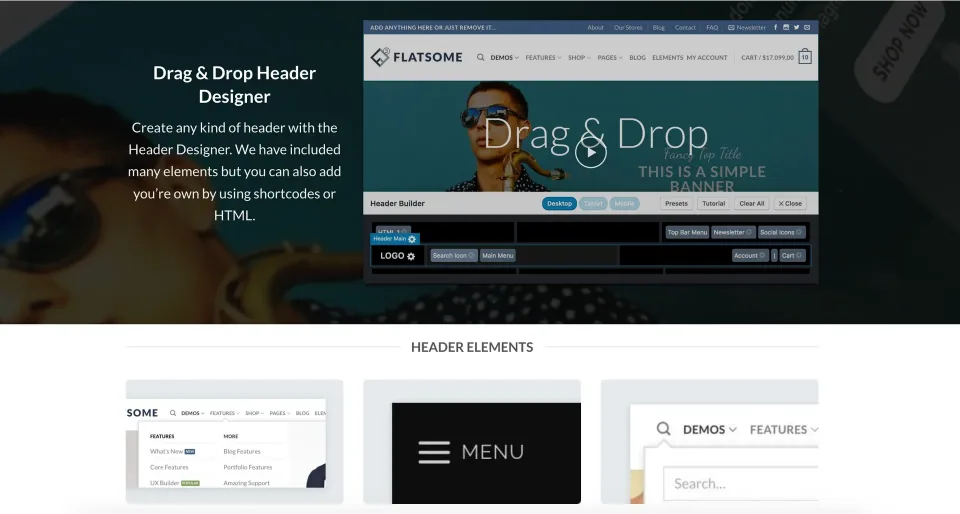
The vendor preview distinguishes page editing from surrounding theme controls. A handoff should explain which interface the owner uses for each routine change.
Worked example: three changes before a weekend sale
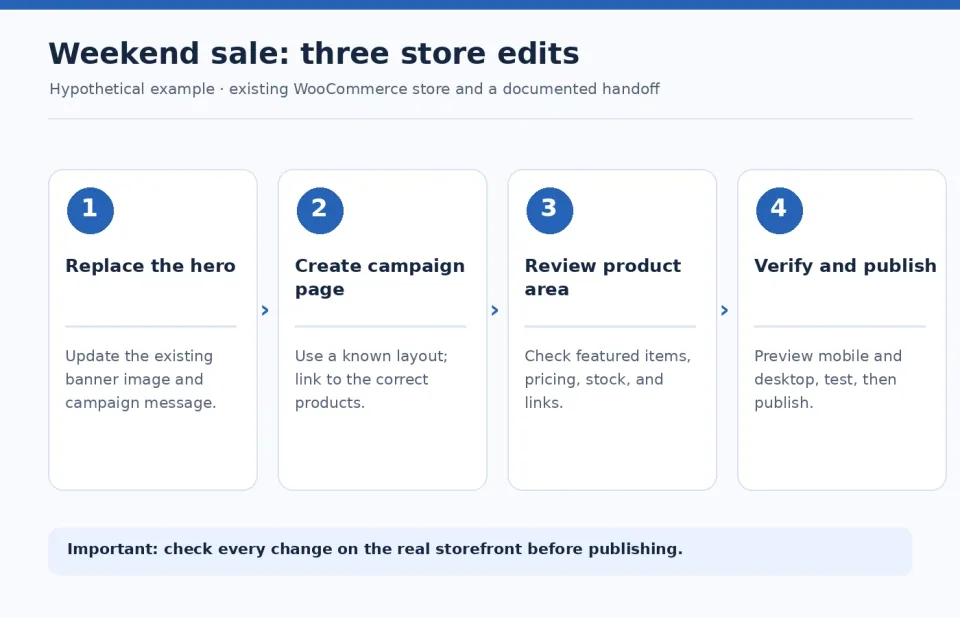
Hypothetical sale update workflow: edit banner, prepare campaign page, check products, and preview
Hypothetical scenario — not a live Flatsome test: a small homewares store wants to announce a Friday-to-Sunday promotion. The owner has administrator access and a recent backup, and the agency has already provided an editing map.
Task 1: Replace the homepage hero
Locate the existing page section or assigned UX Block; replace the banner image and promotional copy; check the call-to-action URL. Inspect the mobile crop, legibility, alt text, and the page after cache refresh. If the owner cannot identify the content source, stop and request a location map rather than editing random blocks.
Task 2: Create a campaign page
Duplicate a proven landing-page pattern or import an appropriate Studio layout. Set the page to draft, replace demo text and imagery, check headings and product links, then preview at desktop and phone widths. The result can be self-managed if the store has a stable layout process and permissions.
Task 3: Feature sale products
First confirm whether the section is curated manually, populated by category, or selected through WooCommerce data. Update the correct source and verify that prices and availability match the actual products. If a custom query or PHP hook determines the section, request technical review.
A realistic success criterion
The update is complete only if the owner can identify the edited source, verify the public page and a narrow mobile viewport, confirm the promotion is accurate, and restore the previous state. No minutes saved, conversion gain, or error rate is claimed here.
When the builder does not behave as expected
An editor that will not load or a banner that looks different on the frontend is a reason to investigate—not proof that Flatsome is generally unreliable. A Reddit post dated January 18, 2025 describes UX Builder stalling on the WordPress posts page while other pages could still be edited. The author reported that disabling plugins did not solve their specific case. That is one user report, not a measured incidence rate.
Check whether the target is a normal page, a designated posts/archive page, a product, a product template, or a UX Block. Different WordPress surfaces have different editing behavior, and a page configured as a posts index is not the same as a conventional landing page.
Check whether a change is saved but not visible
Confirm that the right page/block is being edited and the correct site environment is open. Check caches and responsive visibility settings, then compare preview with frontend. Avoid deleting reusable blocks merely because one instance seems stale.
Troubleshoot without risking the live shop
Capture the URL, browser error, affected page type, theme version, relevant plugin versions, and reproduction steps. Use staging for controlled plugin-conflict tests; do not disable checkout or caching plugins on a busy production store without a rollback plan. The 2026 Flatsome changelog includes specific prior fixes for UX Builder server errors in some setups, reinforcing the need to check versions before assuming an old report still applies.
Escalate when the admin interface remains broken after safe basic checks, the problem affects checkout, or the change requires touching theme templates, PHP, JavaScript, server configuration, or WooCommerce hooks.
What works—and where the trade-offs begin
What works well
Visual editing can make routine text, image, and promotional layout changes practical without coding once the site has been mapped.
Reusable UX Blocks help keep repeated sections consistent, with the benefit of a single edit point.
Documented custom product layouts can be assigned globally, by category, or by product; this flexibility matters for merchandising.
What to consider
Visual editing does not cover every WooCommerce setting, plugin behavior, or checkout integration.
Shared blocks and global templates widen the impact of a mistaken change; ownership and scope must be understood.
Future theme migration may require content and layout auditing; the exact effort depends on how the site was built.
Theme license, support, and the real ownership budget
Flatsome Classic — Regular License · License & support
Envato Regular License for a single end product; applicable to a typical publicly accessible WooCommerce storefront.
Flatsome Classic — Regular License · Renewal
No annual theme license renewal. Future author-released updates included; paid author support extension is optional after the included six months.
Flatsome Classic — Extended License · License & support
Envato Extended License for a single qualifying paid-access end product; not a developer or multi-client license.
Flatsome Classic — Extended License · Renewal
No annual theme license renewal; six months of included author support, optional paid extensions and author-released updates.
Prices checked November 9, 2026 on ThemeForest, in USD, before tax and handling. Regular/Extended describe permitted end-product use, not different feature editions. Either license covers one end product. Selling goods in a publicly accessible WooCommerce store ordinarily does not itself require Extended. Six months of UX-themes support are included, with optional paid extension; author-released theme updates do not require annual renewal. Flatsome Site Builder is a separate product/license with different prices and update terms.
Listed prices may exclude taxes. Promotions and vendor terms can change; confirm at checkout.
The current Flatsome Classic Regular License price comes from the published product profile. Compare its license scope and included support separately from the cost of hosting, backups, paid plugins and future maintenance. Do not confuse Classic with the separately sold Site Builder.
The published Classic Regular License is $59 one-time. Check the actual checkout total, taxes and optional extended support before buying.
Who should choose Flatsome—and who should pause
CHOOSE Flatsome
Best with a clear handoff
Routine content ownership is more realistic after training and documentation.
Consider: Custom WooCommerce behavior and migration may still need technical help.
The migration trade-off: what to audit before choosing a builder
A store can be easy to update within its current system yet costly to redesign later. That is a planning trade-off, not a claim that all Flatsome sites have the same lock-in risk.
Inventory the editable assets
List pages and campaigns created in UX Builder, UX Blocks used by headers or landing pages, custom product templates, theme options, any child-theme modifications, and third-party shortcodes or hooks.
Separate store data from presentation
Product names, prices, variations, and inventory belong to WooCommerce data; custom presentation elements may need rebuilding when changing the theme or builder. Before migration, test what remains readable when the current presentation layer is disabled on staging.
Estimate rework by page type—not only page count
Ten nearly identical landing pages may be simpler to rebuild than a single checkout with multiple customizations. Prioritize homepage, category, product, cart, checkout, account, and high-traffic campaign pages. Set acceptance criteria before migration.
An editability decision matrix for owners
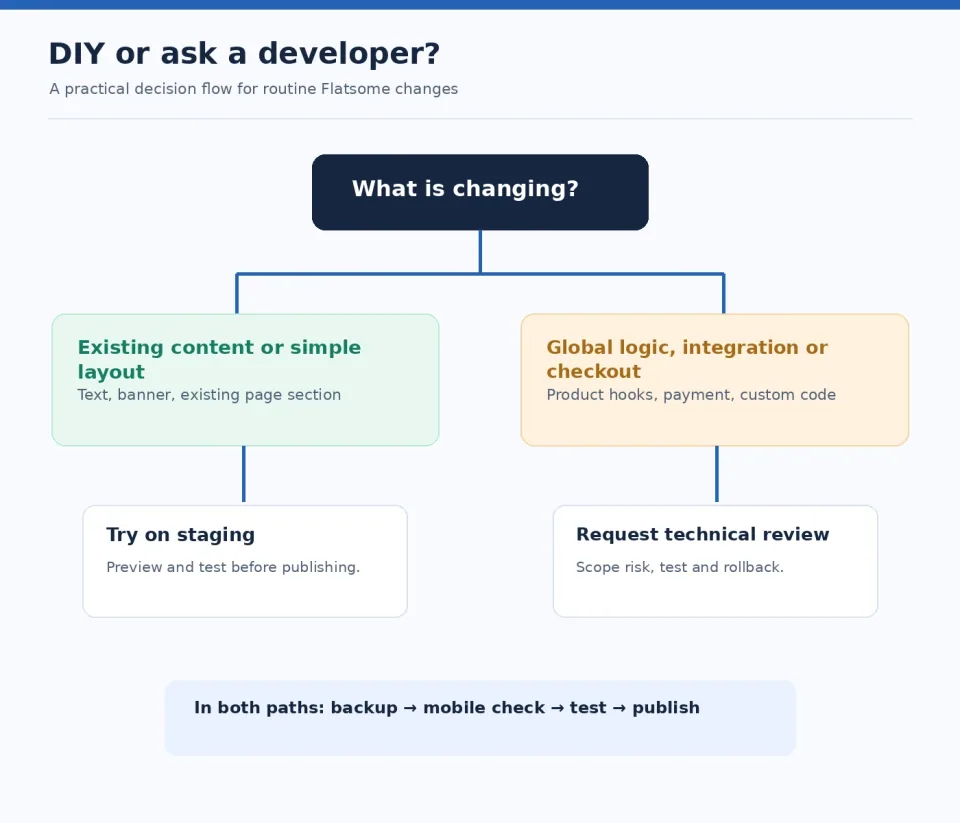
Decision flow for choosing between self-service Flatsome edits and developer assistance
Replace existing text or a banner: generally DIY after a quick location walkthrough; confirm where the content lives and preview desktop/mobile.
Create a straightforward campaign page: DIY after template training; verify layout, product links, offer details, responsive behavior, and accessibility.
Update standard product text, price, or stock: usually an owner’s WooCommerce admin task; verify the product and any scheduled promotion settings.
Change global/category product templates: shared responsibility; an owner may edit visually but should confirm hook coverage and effects on multiple SKUs.
Change checkout logic, payment setup, or custom PHP: technical-owner task with staging, payment-flow testing, and rollback.
Rule of thumb: the greater the potential effect on multiple products or live transactions, the stronger the case for technical review before publication.
Developer-to-owner handoff checklist
✓
Map each editable area
Record whether the homepage hero, shop header, product highlights, footer promotion, and campaign pages are edited through a page, UX Block, product field, or theme option.
✓
Identify shared and global layouts
Mark blocks reused across pages and any global/category/product templates. Include the list of pages or product families they affect.
✓
Verify roles, staging, and rollback
Demonstrate who can edit, how to make a backup, how staging works, and who restores production if an update fails.
✓
Practice three real tasks
Have the owner change a banner, edit a product description, and update a promotion on staging, then verify the frontend at desktop and mobile widths.
✓
Document support boundaries
Specify who owns plugin conflicts, checkout changes, security updates, failed UX Builder sessions, and paid maintenance.
✓
Keep a campaign publishing checklist
Check links, offer dates, product price and inventory, mobile crop, accessibility, caches, and rollback instructions before launch.
How we researched this review
Desk research checked November 6, 2026. We reviewed the UX Themes documentation for Studio, shop headers, custom product layouts, and theme updates; the ThemeForest listing and changelog; Envato item-support policy; and a dated Reddit troubleshooting report. We separated vendor-documented capabilities, an individual user report, and WPToolWatch editorial inferences. No Flatsome instance was installed or tested for this article, no benchmark or task timing was measured, and no vendor support case was opened. Some UX Themes tutorials were last updated in 2020 and their exact menu labels require verification in a current installation. Changelog fixes can make old bug reports inapplicable. Pricing and support details are snapshots rather than guarantees.
Frequently asked questions
Can I use Flatsome without knowing how to code?+
For existing visual content and conventional WooCommerce product management, often yes, once you know where edits live. Changes to integrations, checkout logic, or custom templates may still need technical skills.
Can I edit every WooCommerce page using UX Builder?+
No universal assumption is safe. Product data, generated archives, special WordPress pages, and checkout-related functionality have different editing workflows. Confirm the exact page type and installed version before committing to an editing plan.
Can I customize product layouts for only one category?+
UX Themes documents category-specific and product-specific custom layout assignments alongside global layouts. Check the selected assignment and plugin-hook compatibility on staging before rolling changes into production.
If my UX Builder hangs, is Flatsome broken?+
Not necessarily. Identify the page type, reproduce the symptom, check versions and safe environment-specific causes, then escalate with logs. An individual forum report is not proof of a current widespread defect.
Do free updates mean free lifetime support?+
No. The ThemeForest listing offers future updates, while Envato’s author-support period starts at six months and can be extended or renewed under its conditions. The two benefits are distinct.