WPWeb’s WooCommerce voucher plugin links branded gift PDFs and unique codes with recipient delivery, online or in-person redemption, and WooCommerce orders.
I would shortlist this plugin for a WooCommerce business where a gift or service voucher has to survive the journey from online payment to a physical counter. It earns its place through code tracking and redemption rules, not because it can generate PDFs. Choose the license according to access to the finished site, then test recipient delivery, coupon use, staff permissions and late cancellations. The recommendation is documentation-based; no hands-on compatibility test was performed.
Why this rating?
WooCommerce PDF Vouchers is useful when an online purchase must become a traceable voucher redeemed by staff. Code tracking and redemption rules justify the extra system, while cancellation handling, partial use, permissions and PDF delivery need end-to-end checks.
Research & assessment details
Documentation-based assessment by WPToolWatch Editorial. No hands-on benchmark.
WPWeb’s WooCommerce PDF Vouchers turns a downloadable WooCommerce product into a gift certificate, service pass or event voucher with a trackable code. A buyer can give it to someone else; staff can check or redeem it when the customer arrives. The attraction is not the PDF itself. It is the connection between WooCommerce payment, recipient delivery and redemption. This is a voucher system, not a replacement for WooCommerce checkout or an invoicing plugin.
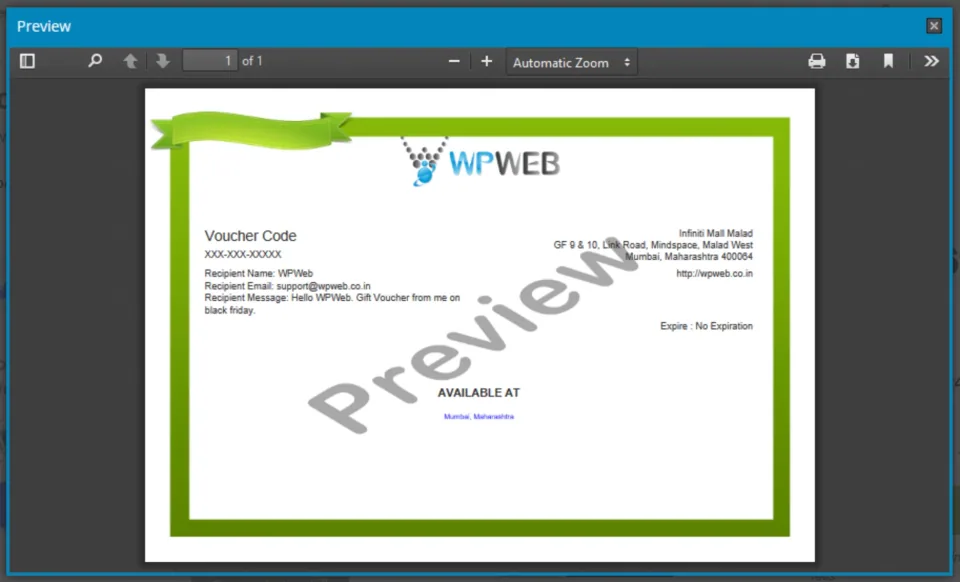
A sample voucher illustrates the PDF deliverable; check the actual template, text and output before sending it to customers.
Who should buy it—and who should not
I would consider it for salons, classes, venues and other merchants who collect payment online but deliver something later or in person. Vendor and location information, expiry controls and reports support that workflow. If you only want a discount at checkout, start with WooCommerce’s native coupons instead. You would otherwise be adding code issuance, PDF generation and staff procedures without gaining much.
A gift-voucher example shows the type of deliverable this plugin is intended to produce; the merchant still defines the offer and redemption rules.
Choose the right redemption path
Vouchers can have generated or imported codes, QR/barcode elements, expiry and usage rules, and partial redemption. Online coupon use is optional: enable Auto Enable Coupon Code Generation to create the matching WooCommerce coupon. A QR code can display a code, open a redemption page or redeem automatically; the automatic QR-redemption mode does not work with partial redemption. Decide whether staff will redeem at a counter, customers will redeem online, or both—then test the selected path.
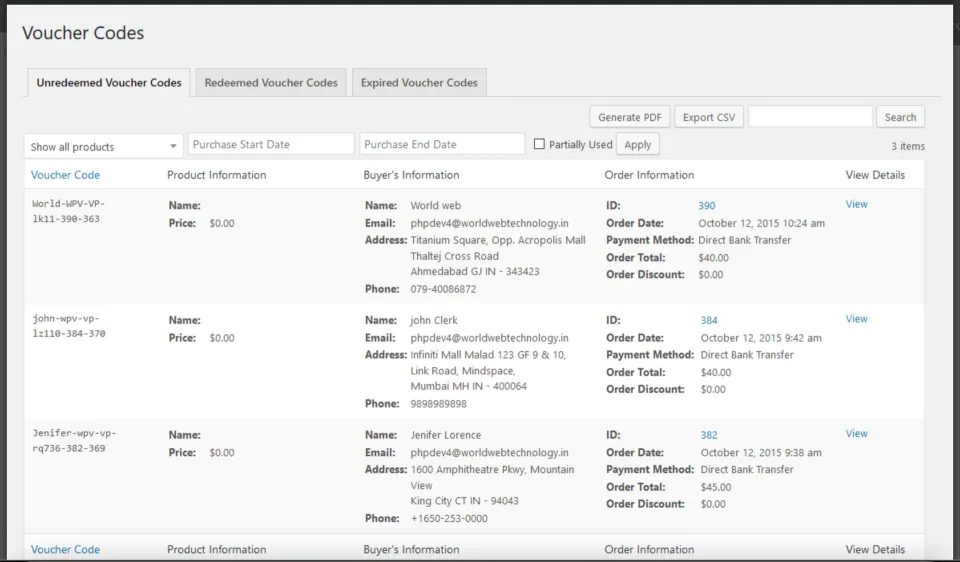
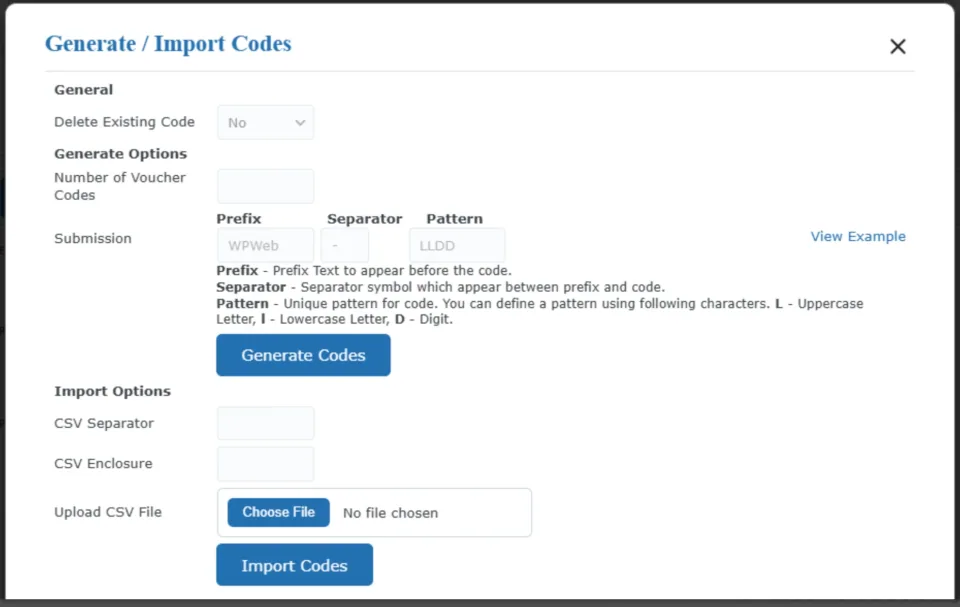
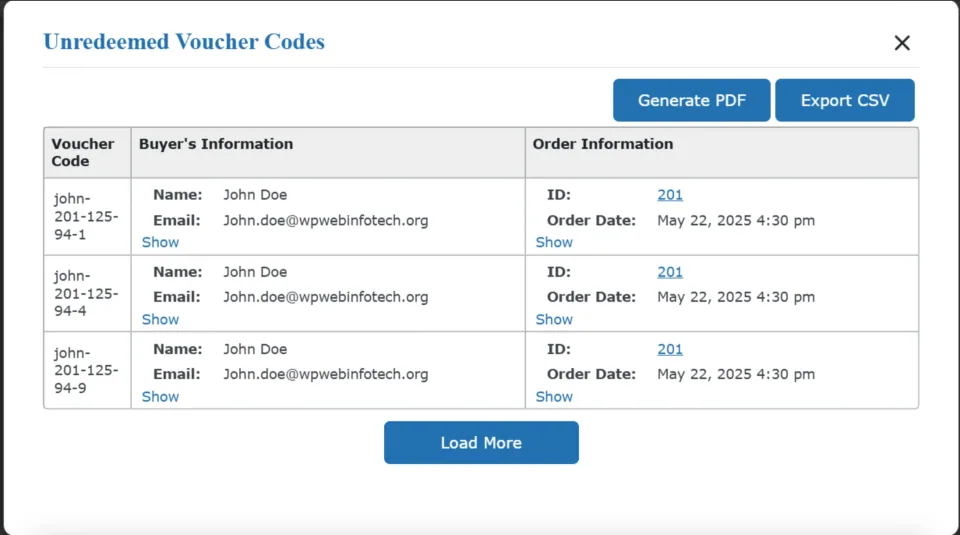
The voucher-code table illustrates redemption tracking. Match the redemption process to the staff and locations that will use it.Code generation and import are part of preparing the redemption workflow. Confirm uniqueness and handling before distributing a batch.
Delivery depends on WooCommerce and license activation
The plugin’s product-level voucher controls are documented for simple or variable products marked as downloadable. PDF availability follows WooCommerce download permissions: Completed is the usual trigger, while Processing can be allowed through store settings. Buyers can receive order downloads and, if configured, a separate recipient email. You also need a valid CodeCanyon purchase code to activate the plugin before its settings are editable. Test license activation, order emails, recipient details and a real PDF on staging.
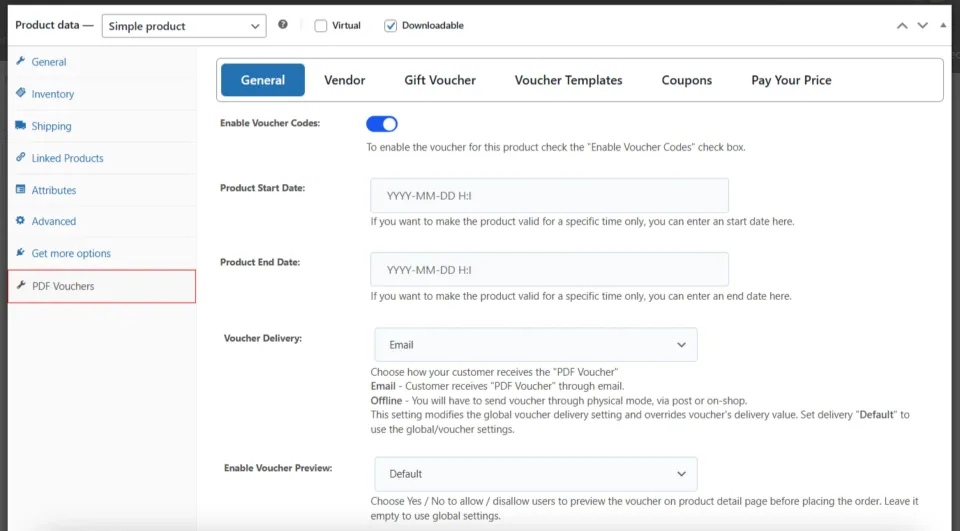
Voucher delivery starts with the product configuration. Check the generated file and customer email through a real test order.
Refunds are not the same as cancellations
WPWeb documents automatic voiding for failed orders and for full or line-item refunds, including partial-quantity refunds. Version 5.2.5 fixed refunded codes that still appeared valid. But the setup guide explicitly warns that cancelling an order after it reached Processing can leave an issued voucher usable; an administrator may need to manually mark it redeemed to prevent reuse. If you sell vouchers with cash value, this exception deserves a written staff procedure and a staging test before accepting orders.
Unredeemed codes need an explicit cancellation and refund process so the store’s payment and voucher records stay consistent.
Regular and Extended are usage licenses—not feature tiers
WPWeb sells through CodeCanyon. Regular and Extended contain the same plugin; each license covers one end product, with future item updates and six months of author support listed. A commercial storefront that anyone can visit generally fits Regular even though it sells paid products. Extended relates to charging users to access the end product itself. Optional support extensions, taxes and separate add-ons can change the total cost. Confirm unusual access or membership models against Envato’s terms.
Compatibility and PDF output require a real-world check
The developer’s September 2026 setup guide still names WordPress 4.4+ and WooCommerce 2.6+, alongside PHP 7.4+. Those are published minimums, not evidence that every current WordPress/WooCommerce pairing works. CodeCanyon lists specific tested generations rather than an open-ended guarantee. The vendor FAQ also describes image-size, TCPDF and PHP-memory problems. Test your checkout, PDF backgrounds, QR scans and staff permissions on the actual hosting stack; I have no independent performance or compatibility benchmark for this plugin.
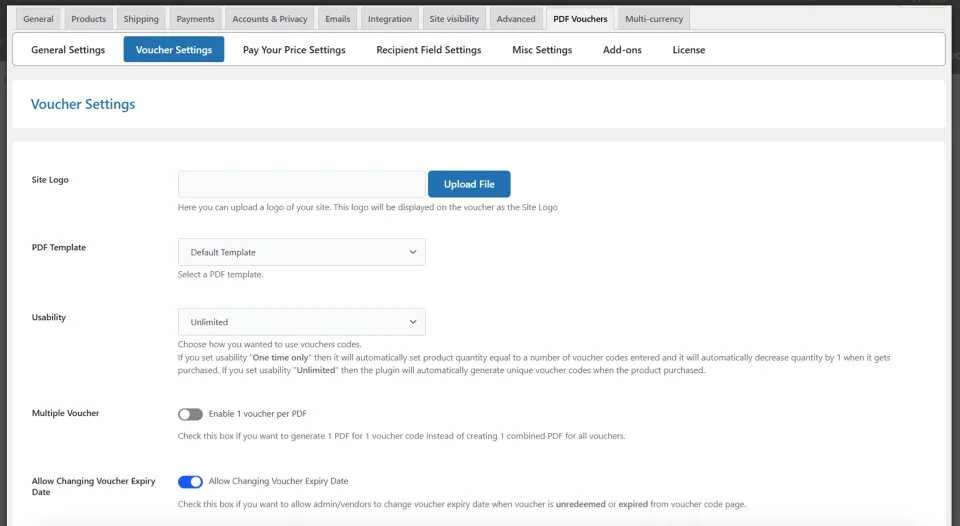
Template settings determine the document output. Test long names, special characters and the intended print format before launch.
Buying verdict
My recommendation is conditional: choose WooCommerce PDF Vouchers if you need a branded, traceable gift or service voucher that crosses online purchase and offline fulfillment. Its controls are substantial, but the real cost includes configuring the workflow and training the people who redeem codes. For a public storefront, review Regular first; before launch, simulate the complete journey—from payment and gift email to partial use, refund and late cancellation. This assessment is based on current documentation, not a hands-on test.
WPWeb PDF Vouchers — Regular License · License & support
Envato Regular: one finished end product accessible to end users without an access fee. A publicly accessible ecommerce store may be commercial.
WPWeb PDF Vouchers — Regular License, WPWeb PDF Vouchers — Extended License · Renewal
One-time item purchase; marketplace lists future item updates and six months of author support. Extra author support, taxes and fees may cost more.
WPWeb PDF Vouchers — Extended License · License & support
Envato Extended: one finished end product for which end users may be charged for access; not an unlimited-site license.
CodeCanyon listing rechecked 2026-11-09: Regular $45 and Extended $239 (one-time; USD). Both include the same plugin and each is limited to one end product. Regular is generally appropriate for a public-access commercial ecommerce site; Extended is used for paid access to the end product, under Envato terms. Future item updates and six months of WPWeb author support are listed, not perpetual hands-on support. Extra support, separate optional add-ons, tax and handling charges may apply. The developer sells this product through Envato; no official Free or independent direct subscription tier was verified. Actual payment and license activation were not tested.
One-time marketplace purchase with listed future updates
What to consider
More configuration and staff training than native coupons
An order cancelled after Processing can leave a voucher usable until staff intervene
Automatic QR redemption does not support partial redemption
PDF backgrounds, image paths or memory limits can require troubleshooting
One end product per license; support extension and add-ons cost extra
Best for
WooCommerce shops selling giftable services, event admissions or experiences that need a branded PDF and a code staff can validate in person or shoppers can redeem online.
Consider alternatives if
Stores that need only a simple promotional coupon, businesses not using WooCommerce, or teams unwilling to test PDF delivery, refund exceptions and cashier permissions before launch.
BEFORE YOU DECIDE
Frequently asked questions
Is this the same as WooCommerce PDF Product Vouchers?
No. This profile covers WPWeb WooCommerce PDF Vouchers, CodeCanyon item 7392046. The similarly named WooCommerce.com extension is a different plugin; do not mix their documentation, pricing or licenses.
Why use this instead of a regular WooCommerce coupon?
Use standard coupons for ordinary cart discounts. WPWeb’s plugin adds branded PDF delivery, gift recipient fields, trackable voucher codes and staff redemption—useful when the customer pays online but redeems a service or experience later.
Do I need to activate a purchase code before setup?
Yes. The developer’s setup guide states that the CodeCanyon purchase code must be activated before the PDF Voucher settings can be viewed and edited. Plan license activation as part of staging setup.
Can a voucher be redeemed through WooCommerce checkout?
Yes, when Auto Enable Coupon Code Generation is enabled. This creates a WooCommerce coupon for the voucher code. Configure the coupon restrictions and test tax/discount behavior before accepting live purchases.
Can staff scan a QR code and partially redeem its value?
The plugin documents both QR codes and partial redemption, but its automatic QR Redeem URL mode does not work for partial use. Choose a code-display or interactive redemption path if staff must record remaining value.
When does a gift recipient get the PDF?
PDF access follows downloadable product order status—normally Completed, or Processing if WooCommerce is configured to grant downloads then. Recipient email delivery is optional and follows the same configured order flow.
Does a refund or cancelled order automatically disable the code?
The developer documents voiding for failed orders and full, line-item and partial-quantity refunds. However, a voucher issued while an order was Processing can remain usable if that order is later cancelled. A staff member may need to invalidate it manually; test the exact sequence on staging.
Should I buy Regular or Extended?
Both license types include the same plugin for one end product. Under Envato’s standard terms, Regular generally covers a publicly accessible ecommerce site even when it sells paid goods; Extended concerns charging users for access to the finished end product. Check unusual membership models with Envato.
Does it work with the latest WordPress and WooCommerce versions?
The September 2026 setup guide lists PHP 7.4+, WordPress 4.4+ and WooCommerce 2.6+ as minimums; those legacy figures are not proof of compatibility with your current versions. The marketplace lists specific tested generations. Confirm newer stacks with WPWeb and test your theme, checkout and hosting.
How much does it cost and is support lifetime?
On 9 November 2026 CodeCanyon listed $45 Regular and $239 Extended as one-time purchases, including future item updates and six months of author support. Support extension, taxes and handling may cost extra. Separate add-ons are not necessarily included.
Alternatives & comparisons
Explore other published WordPress products, with matching categories listed first.
CURCY lets WooCommerce shoppers view prices and pay in different currencies. Free handles up to two currencies; Premium adds unlimited currencies, scheduled rates and more control over checkout and payment methods.
Edit WooCommerce prices, stock, variations and supported custom fields from a spreadsheet-style grid. This is the original CodeCanyon WCABE plugin—not WPMelon’s newer Free/Pro editor.
WooCommerce currency switcher for localized product prices and optional selected-currency checkout. Compare its two-currency Free edition with annual and lifetime Pro licenses.