Edit WooCommerce prices, stock, variations and supported custom fields from a spreadsheet-style grid. This is the original CodeCanyon WCABE plugin—not WPMelon’s newer Free/Pro editor.
For a store already running classic WCABE reliably, I would not switch tools merely because WPMelon has released a rewrite. The grid still addresses real catalog-maintenance work. For a new purchase, though, I would compare the newer Free/Pro editor and WooCommerce’s native tools first. What matters is whether the exact variation and meta-field workflow works on your store—not a promise to edit thousands of products in minutes.
Why this rating?
WooCommerce Advanced Bulk Edit provides a useful spreadsheet workflow for catalog and variation maintenance. Its legacy product track and edge cases around custom metadata require care; existing users may benefit more than new buyers who can compare native tools and the newer editor first.
Research & assessment details
Documentation-based assessment by WPToolWatch Editorial. No hands-on benchmark.
WooCommerce Advanced Bulk Edit: the original WCABE
WooCommerce Advanced Bulk Edit (WCABE) lets store managers change product data from a grid rather than open one WooCommerce product page at a time. It is most useful when price, stock or catalog-structure changes recur across many SKUs. The grid is a practical editing interface, not an automated inventory synchronization service.
This is the paid CodeCanyon plugin originally sold by georgeiron and documented by WPMelon. The vendor now offers a separate, rewritten WPMelon Advanced Bulk Edit with Free/Pro plans. Its subscription terms, features and PHP requirements must not be assumed to apply to this classic product.
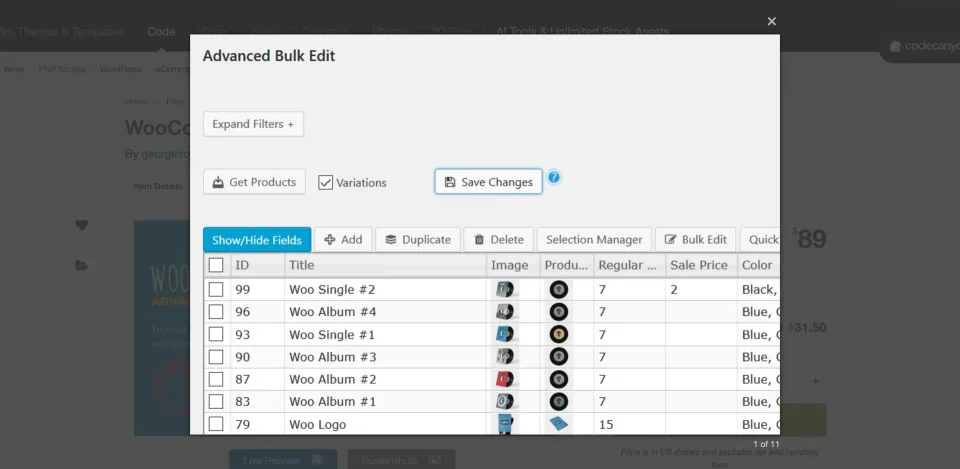
The bulk-edit dialog works on a chosen product set. Review that selection before changing several records at once.
Where the classic editor earns its place
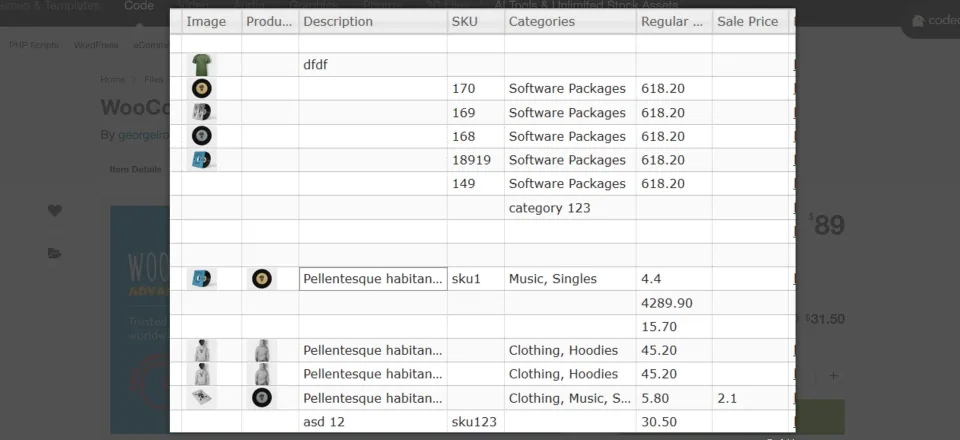
The vendor documents column controls, saved layouts, filters, a Selection Manager and direct cell editing. Bulk operations can adjust prices by a fixed amount or percentage, modify text, and assign or remove categories, tags and attributes. Those controls matter when the same change must be applied consistently to a deliberate subset of products.
WCABE can edit and generate product variations and expose supported custom/meta fields and taxonomies. That makes it more useful than a simple price-only editor, but custom fields vary in storage and validation. An ACF field or data created by another extension should be checked on a staging copy before any large save.
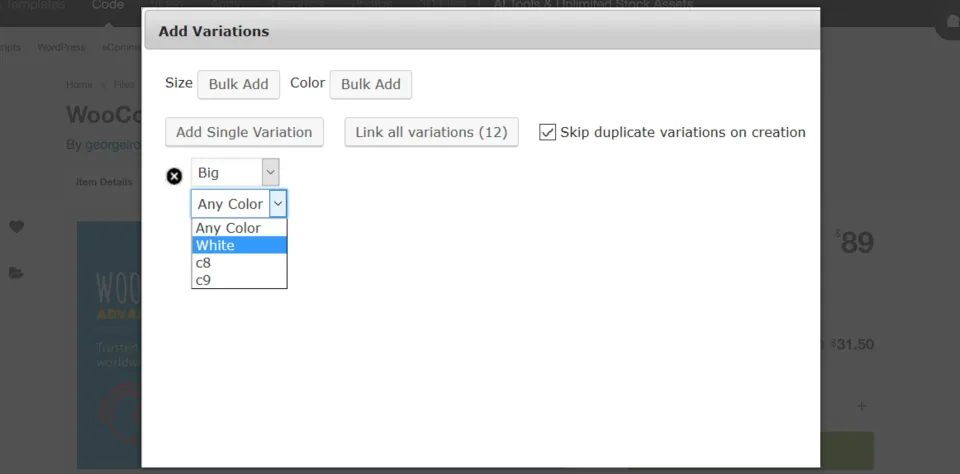
A spreadsheet-style product list is the core bulk-editing workflow: narrow the selection before applying changes.Variation creation is a distinct editing task. Check the attributes and resulting combinations on a small sample first.
Operational limits to plan for
Filtering the wrong selection can change far more products than intended. Back up the database, test a small SKU set, then inspect regular and sale prices, variation stock, attributes and storefront visibility after saving. The classic guide labels its old CSV Update function deprecated; use WooCommerce’s import/export tools for a CSV-centered workflow.
Paste From Excel is an optional WCABE add-on, not a core license feature. WPMelon advertises an early-access $19 one-time add-on for WCABE 5.5+, with SKU matching and a preview in the grid before the final WCABE save. Do not confuse it with spreadsheet tools offered in the separate newer WPMelon plugin.
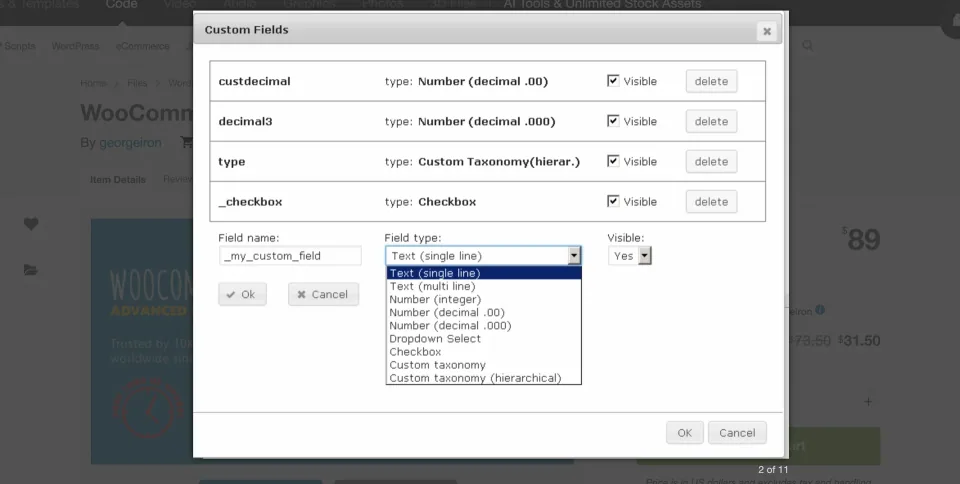
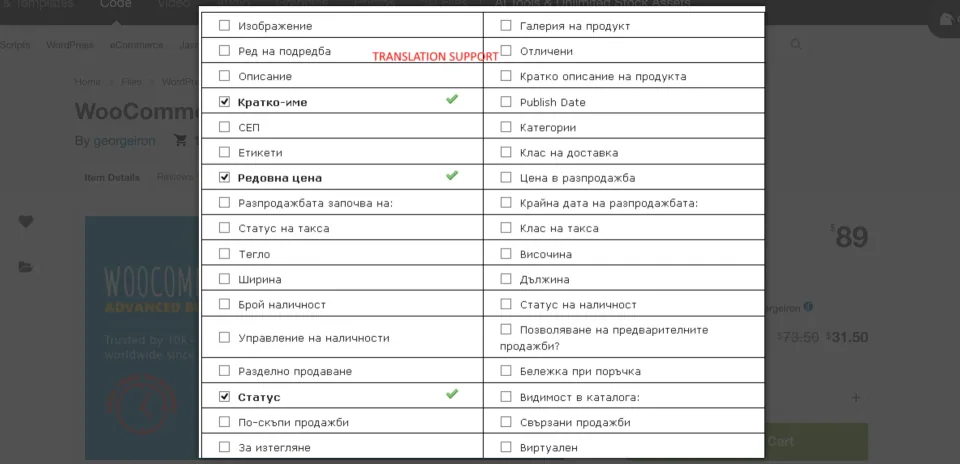
Custom-field configuration needs the correct field keys and value formats. Test a small product selection before a wider update.Field settings control which product values appear in the editing workflow. Keep the visible columns aligned with the task being performed.
Cost, support and update access
On November 9, 2026, the CodeCanyon category listing showed $89 Regular, while an older retrieved item-detail page displayed $69 Regular and $199 Extended. The structured price uses the $89 category observation but is not a verified checkout quote. Both Envato license types cover one end product; a publicly accessible store selling physical goods does not automatically need Extended.
CodeCanyon lists future author-released updates and six months of support, with an optional support extension. A previous WPMelon changelog tied the WordPress-dashboard automatic updater to active support while manual CodeCanyon downloads remained available; confirm today’s updater rules before renewal. The legacy changelog lists version 6.2.1 from August 25, 2026. Minimum PHP and production compatibility with WooCommerce 11 remain unverified.
CodeCanyon Regular License (legacy WCABE) · License & support
Regular License for one publicly accessible end product, including ordinary retail WooCommerce shops; paid access to the end product may require Extended.
One-time CodeCanyon purchase, with six months of author support and the option to extend support. Future available item updates are listed by Envato; WPMelon’s dashboard update entitlement may depend on support status. Category lists $89, older item detail $69: confirm checkout.
Checked November 9, 2026. CodeCanyon’s WooCommerce products category showed $89 for the original WCABE by georgeiron; an older item-detail and support snapshot showed $69 Regular and $199 Extended. The structured Regular price is the $89 observed category listing, NOT a verified cart price. No current Extended checkout price was confirmed, so no new Extended plan has been fabricated. Marketplace taxes, fees and optional support extension are additional. One Envato license generally covers one end product; ordinary public ecommerce alone does not require Extended. Six months author support is included, with future author-released updates. A historical WPMelon 5.2 changelog says dashboard auto-updates required active support and manual CodeCanyon downloads remained available; verify current entitlement. The newer WPMelon Advanced Bulk Edit Free/Pro and separately advertised $19 early-access Paste From Excel add-on are not included in the classic plugin purchase.
Spreadsheet-style edits across multiple product fields in one view.
Targeted filtering, selection rules and percentage or fixed-amount price changes.
Variation generation and editing alongside supported custom fields and taxonomies.
An actively maintained legacy branch, with documented vendor support and recent fixes.
What to consider
The classic workflow requires careful selection and verification before saving broad edits; it is not a substitute for backups.
Some third-party or serialized meta fields may not behave like standard product fields.
Built-in CSV Update is deprecated, while Paste From Excel is a separate paid add-on.
The older product line creates a migration and maintenance decision for stores adopting the newer editor.
Best for
Stores already using classic WCABE that regularly maintain large or complicated WooCommerce catalogs, especially variation prices, inventory and supported custom/meta fields. Also worth evaluating when its selection and bulk actions fit a proven workflow.
Consider alternatives if
A new store looking for the rewritten WPMelon Free/Pro editor, a scheduled inventory-sync platform, or guaranteed rollback of previously saved bulk edits. Small catalogs with infrequent changes may be better served by WooCommerce’s built-in editing and CSV tools.
BEFORE YOU DECIDE
Frequently asked questions
Is WCABE the same as WPMelon Advanced Bulk Edit Free/Pro?
No. This profile is for the original paid CodeCanyon WooCommerce Advanced Bulk Edit (WCABE). WPMelon also sells a newly rewritten Advanced Bulk Edit with a free WordPress.org edition and separate Pro plans. Compare their features and licenses separately; there is no confirmed one-click migration path here.
What does classic WooCommerce Advanced Bulk Edit cost?
On November 9, 2026 the CodeCanyon WooCommerce category showed $89 Regular for georgeiron’s WCABE. An older item-detail snapshot still showed $69 Regular and $199 Extended. The $89 plan in this profile is an observed category price, not a verified cart total. Check the actual checkout before ordering.
Who should choose the classic version rather than the new one?
If an existing store uses classic WCABE successfully for custom fields and variations, staying with it may avoid a risky workflow change. For a new installation, first compare the newer WPMelon Free/Pro editor and WooCommerce’s built-in bulk editing. Test the fields and variations you actually manage.
Can classic WCABE edit prices, stock and variations together?
WPMelon documents regular/sale price changes, quantity and stock-status editing, filtering, variable-product rows and variation generation. Use a narrow selection, save a test batch, and confirm the resulting product and variation data on the storefront.
Does it support ACF and third-party custom fields?
Its classic guide documents finding supported custom/meta fields, including fields created by ACF or SEO plugins, plus custom taxonomies. This is not a guarantee that every serialized array or complex field structure edits correctly; validate the particular fields on staging.
Is Paste From Excel included in the base plugin?
No. WPMelon advertises Paste From Excel as a separate early-access $19 one-time add-on for classic WCABE version 5.5 or later. It matches pasted rows by SKU and previews changes in the WCABE grid; you still need to click WCABE Save Changes to write them to the database.
Can the classic plugin replace a WooCommerce CSV importer?
Not reliably as an import pipeline. Its older guide labels the hidden CSV Update function deprecated. Use WooCommerce’s native CSV import/export features if files are the main input, or review the paid WCABE Excel add-on when direct sheet-paste workflows matter.
Can I undo a bulk update after saving?
Do not assume all saved bulk changes can be rolled back from the classic plugin. The separate Paste From Excel add-on advertises an undo operation before changes are persisted through the core WCABE Save Changes action. Take a database backup and verify a rollback procedure before large catalog edits.
What license and support are included?
CodeCanyon describes Regular and Extended licenses as covering one end product each. A public shopping site can normally use Regular even when goods are sold; requiring payment to access the end product can change the license needed. The item includes six months of author support and future updates released by the author; optional support extensions cost extra.
Do updates work after author support expires?
Marketplace access to released item updates and the plugin’s WordPress-dashboard updater are distinct. WPMelon’s earlier version 5.2 changelog restricted its automatic-update feature to active support, while other buyers could download updates manually from CodeCanyon. Confirm the current policy for your purchase code before relying on dashboard updates.
Which PHP, WordPress and WooCommerce versions are supported?
The legacy changelog lists 6.2.1 dated August 25, 2026. CodeCanyon currently indexes the original plugin with WooCommerce compatibility through 10.x, but no legacy-specific minimum PHP version was verified. WordPress 7.x and WooCommerce 11 require confirmation on your actual stack; do not copy the newer plugin’s PHP 8.0 minimum into classic WCABE.
Alternatives & comparisons
Explore other published WordPress products, with matching categories listed first.
CURCY lets WooCommerce shoppers view prices and pay in different currencies. Free handles up to two currencies; Premium adds unlimited currencies, scheduled rates and more control over checkout and payment methods.
WooCommerce currency switcher for localized product prices and optional selected-currency checkout. Compare its two-currency Free edition with annual and lifetime Pro licenses.
Drag-and-drop WooCommerce transactional email designer from VillaTheme, with a capable free edition and Premium rules, reusable blocks and attachments.