Construction starter designs
Vendor-supplied layouts for a focused business website.

A construction-focused WordPress theme from rs-theme built with Elementor and RS Template Builder for contractor and company websites.
Worth shortlisting for a construction business that wants a prepared design and an Elementor workflow. Start with the live demo, then validate one real service page on staging before committing.
Documentation-based assessment by Đoàn Công Tuấn. No hands-on benchmark.
Assessed Nov 16, 2026
Read the review by Đoàn Công Tuấn →
Brickz WordPress Theme is a WordPress theme positioned for construction and renovation businesses. This overview considers its official listing, product screenshots and practical buying requirements.
Before comparing visual demos, write down the three things a visitor should be able to do on your website. For a contractor, that might be understanding your services, seeing relevant past projects and requesting a quote. Use that list to evaluate the demo instead of choosing solely by its opening image.
A small building company needs a focused service website, a portfolio with a few well-explained projects and a clear enquiry path. A prepared design can provide a starting point, while original photography, proof of workmanship and accurate service information give the site its value.
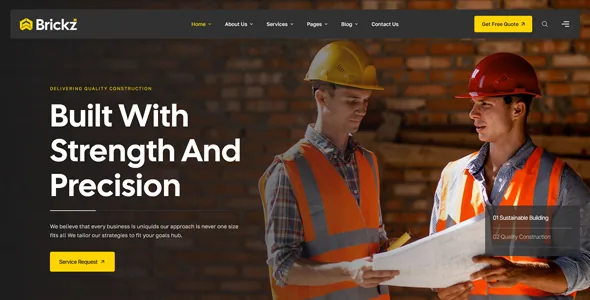
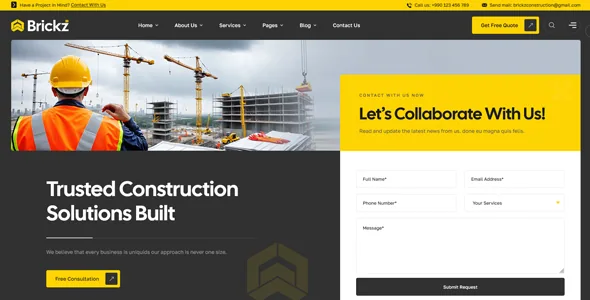
The vendor lists Elementor editing and header/footer tools. If your team already uses that workflow, it is a sensible point to investigate. Ask who will own updates, design changes, backups and the enquiry form after launch. Include those ongoing responsibilities in the decision.
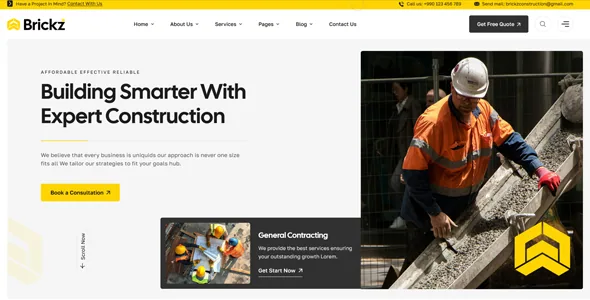
The marketplace showed a listed price of $39 USD when the price was last checked. Recheck the official item page for the current price and license terms before purchasing. The theme price is only one line in the project budget.
| Budget item | What to confirm |
|---|---|
| Theme license | Current checkout price, permitted use and support conditions. |
| Hosting and domain | A plan suited to the finished website and expected traffic. |
| Content and setup | Original photography, service copy, setup and revisions. |
| Ongoing maintenance | Updates, backups, monitoring and ownership after handover. |
Build one representative page on staging, then test the tasks that matter to your business. Check the contact form, navigation, image sizes and accessibility with your actual content. If you need booking, estimating or another specialised function, evaluate that requirement separately and confirm the integration.
Vendor-supplied layouts for a focused business website.
Visual page editing listed by the developer.
A starting point for replacing sample material with your own content.
Layout controls listed in the vendor documentation.
Space to communicate past work and relevant services.
Vendor-claimed support; validate the store workflow on staging.
Vendor-sourced facts are based on published documentation; exceptions are labelled. Sources and check dates are grouped below each section.
Covers: Elementor editor, One-click demo import, WooCommerce compatibility
Covers: Independent performance benchmark
Contractors, renovation companies and small agencies preparing a service website with a project portfolio and a clear enquiry path.
Teams committed to another editing system, or projects whose key requirement depends on an integration that has not been verified.
Construction and renovation businesses preparing a service-led company website and a project portfolio can use the official demo to assess the design. Start with your own service and enquiry requirements before choosing a layout.
The developer lists Elementor as the editing workflow. Try a representative page with your real headlines, images and service information on staging before committing.
The listed theme price is one part of the budget. Hosting, a domain, content preparation, integrations and ongoing maintenance are separate decisions. Confirm the current license and support terms at checkout.
This is a research-based editorial layout demo. We have not completed an independent installation benchmark or accessibility audit of the theme. Vendor statements are identified in the feature section.
The developer lists WooCommerce compatibility. Confirm the specific checkout, form, booking or estimating requirements you need on a staging installation. A general compatibility claim does not establish support for every integration.
Browse the homepage, a service page and a project page on both desktop and mobile. Check navigation and enquiry placement. Then test the same structure with your own content, especially longer headings and original photographs.
Explore other published WordPress products, with matching categories listed first.

Avada combines visual WordPress building and WooCommerce design in two products: one-time Avada Classic and subscription-based Avada One Essential or Pro.

A multipurpose WordPress and WooCommerce theme with BeBuilder, a large demo library and flexible store templates. Best for projects willing to stay in its builder ecosystem.

A multipurpose WordPress theme for business, portfolio and conventional WooCommerce sites, built around its own Avia Advanced Layout Builder rather than Elementor or a native block-first workflow.