Yoast SEO combines WordPress metadata, sitemap and structured-data controls with on-page guidance. Free covers the essentials; paid plans add automation, WooCommerce tools and AI workflows.
For most single-site owners, I would begin with Yoast Free and test the actual publishing workflow. Pay for Premium when redirects, internal-link work and editorial automation save enough time to justify renewal. Choose the WooCommerce bundle for catalog-specific SEO; AI+ is a specialist purchase, not a default SEO upgrade. The traffic-light score is a checklist, not a promise that a page will rank.
Why this rating?
Yoast provides a familiar publishing workflow and useful free metadata and sitemap tools. Premium is best justified by actual redirect and editorial work, while recurring costs, commerce packaging and separate AI products weaken the case for upgrading solely for checklist scores.
Research & assessment details
Documentation-based assessment by WPToolWatch Editorial. No hands-on benchmark.
A reliable editorial workflow, not an automatic SEO strategy
Yoast SEO puts search titles, meta descriptions, XML sitemaps, structured data and writing checks inside WordPress. The free version is enough to set up the basics and catch routine omissions. Its red-orange-green indicators are useful as prompts, but a green score says little about search intent, the strength of the underlying content or whether a URL will rank. I would judge the plugin by what it helps an editor publish correctly, not by how many lights turn green.
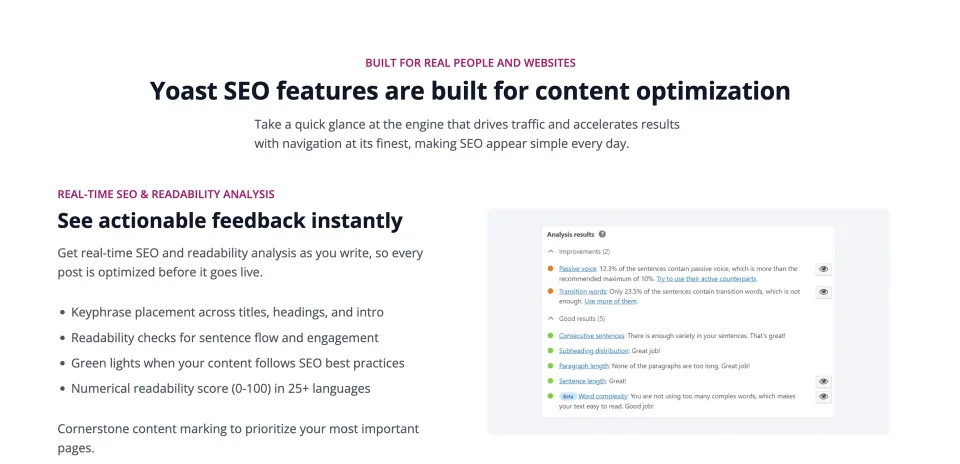
Yoast’s content-feedback preview illustrates the editorial assistance discussed here; recommendations still need human judgment.
Where Premium earns its annual fee
Premium becomes more persuasive on an active publishing site. Redirect prompts help after a URL change; internal-link suggestions surface relevant older pages; multiple keyphrases, bulk metadata assistance and AI drafts reduce repetitive work. Those savings matter if editors regularly update content or maintain a large archive. On a small brochure site with occasional edits, Free is usually the more economical starting point.
Content feedback can help an editor review a draft. It does not replace checking accuracy, intent and readability in context.
What the current Premium bundle actually includes
The current Premium offer also includes Yoast Local SEO, News SEO and Video SEO, plus one Yoast SEO Google Docs add-on seat and paid support. That is a broader package than the old single-plugin comparison, but the add-ons are valuable only if your website uses those formats or workflows. One paid subscription covers one domain, so a multi-client portfolio must budget for additional subscriptions.
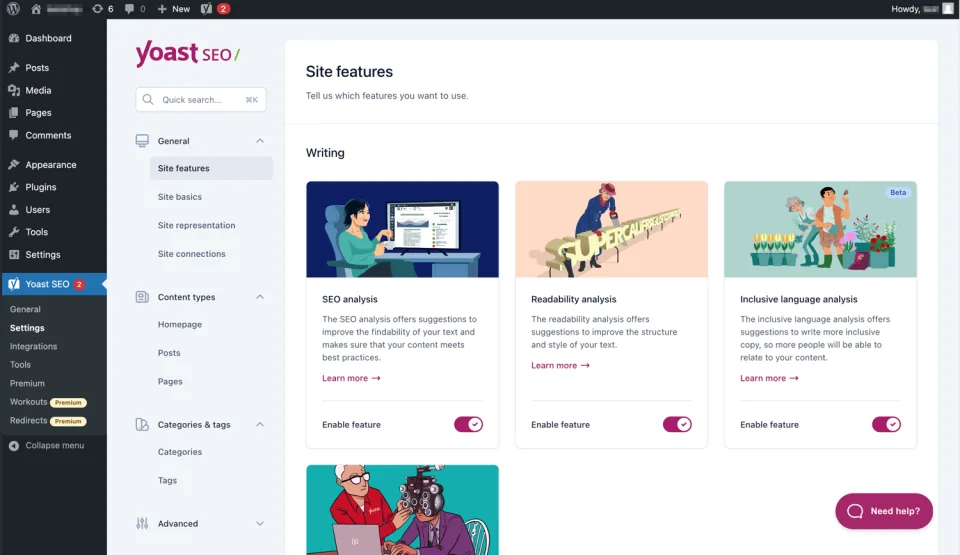
The site-features screen is a place to inspect which tools are enabled. Confirm the paid bundle’s actual entitlement before planning around a feature.
WooCommerce and AI+ solve different problems
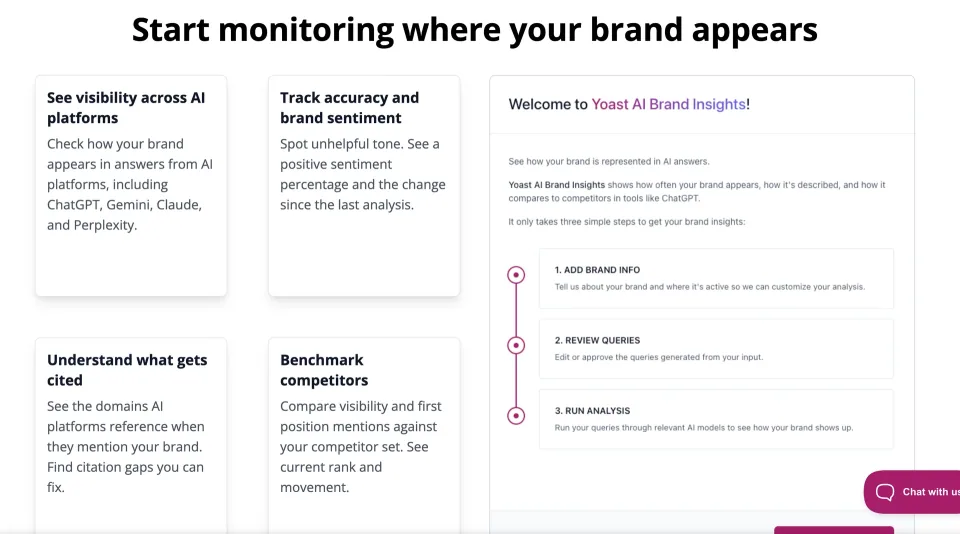
Choose the WooCommerce SEO bundle when product schema, product sitemaps, catalog metadata and merchandising workflows are central to your store. It includes the Premium plugin; the WooCommerce extension is not a stand-alone replacement for Yoast SEO. AI+ goes further with brand-visibility monitoring across AI assistants. That can inform a brand team, but it is a poor reason for a regular blog to pay the highest tier. Neither product guarantees richer results or AI citations.
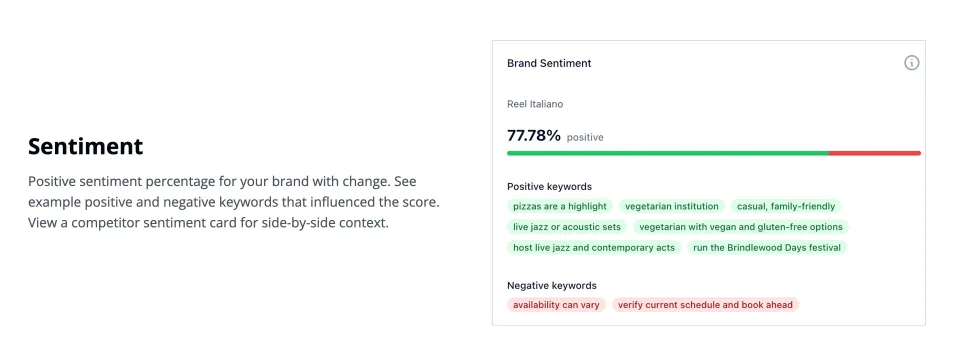
Brand-visibility monitoring is an AI-focused workflow. Evaluate its relevance separately from routine on-page SEO for a blog or small business site.
Technical output matters more than dashboard scores
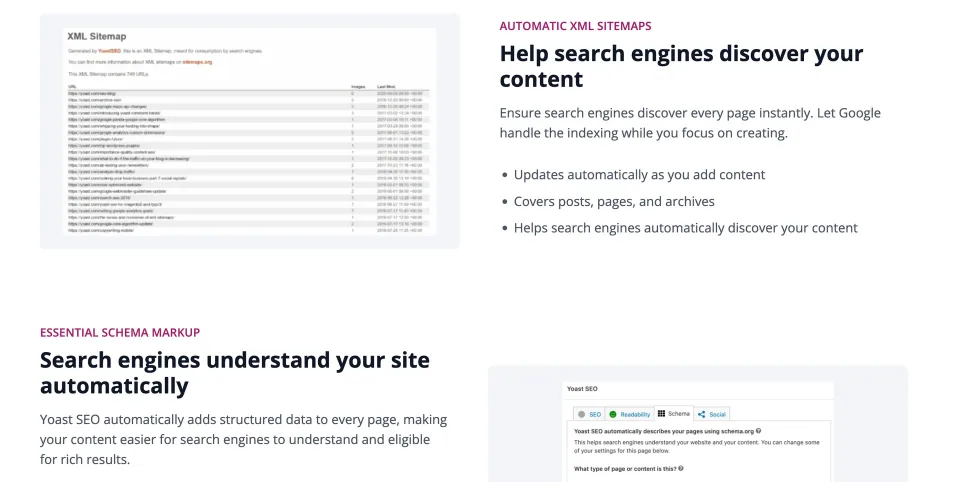
Review actual page titles, canonical URLs, indexability, sitemap entries and structured-data output after configuration. Yoast also documents llms.txt controls, but an llms.txt file does not force search engines or AI assistants to use a page. Official product pages differ on whether Schema Aggregation is included in Free, so treat that specific entitlement as unconfirmed until the installed plugin or vendor confirms it.
The technical SEO overview illustrates output-related controls to check beyond a content score.
Switching from Rank Math without losing the important work
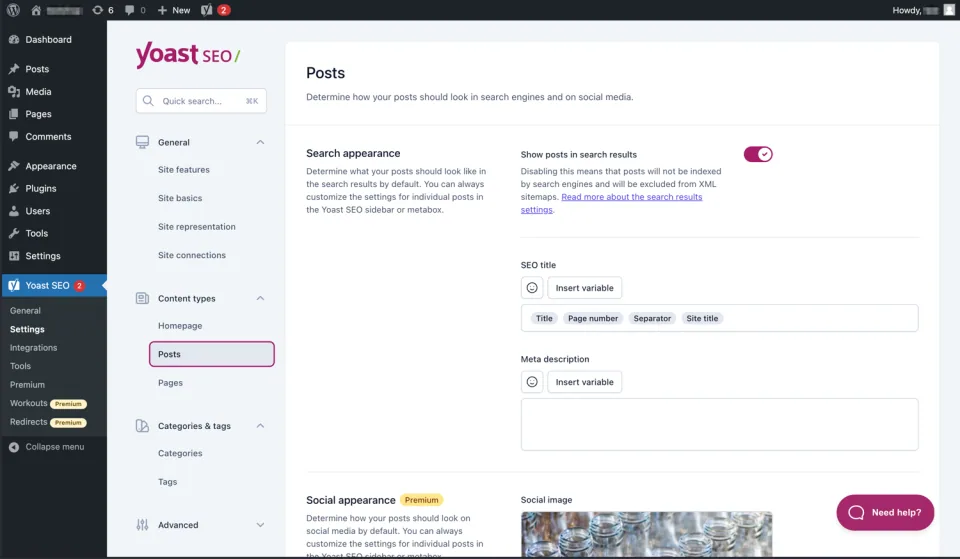
Yoast provides a Rank Math importer for titles, descriptions and keyphrases. Start with a backup and a staging check; deactivate the old SEO plugin before importing so both do not write competing metadata. Compare representative posts, product templates and archives after the move. Redirects, custom schema and sitemap patterns deserve separate attention: an importer does not prove that every setting or third-party rule behaves identically.
Post search-appearance settings are among the outputs to compare after an SEO-plugin migration. Review representative published pages as well as the settings screen.
License, support and cancellation: the real cost
Yoast sells its paid plans as annual subscriptions. The advertised USD prices exclude VAT. Premium covers one domain, and larger organizations may qualify for discounts on multi-subscription orders. An expired subscription can remove access to paid features, updates and support; do not assume a purchased version has perpetual entitlement. Yoast terms provide a 30-day refund period for eligible initial purchases, not normal renewals. Check your contract and the checkout total before paying.
Version and compatibility snapshot
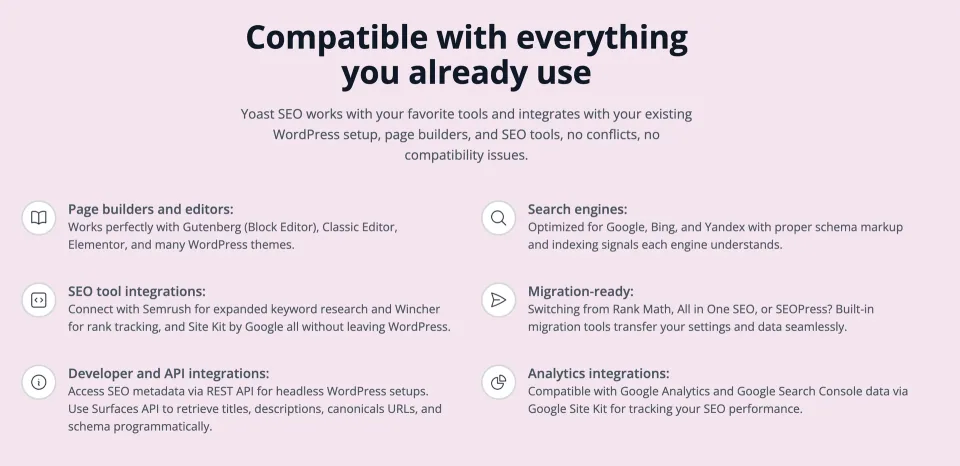
The official WordPress.org changelog lists Yoast SEO 28.8 released October 27, 2026, with a WordPress 7.0 minimum and PHP 7.4 minimum. These requirements describe the free directory release at the time of review, not a tested compatibility guarantee for every theme, hosting setup or Premium add-on. Validate the upgrade on a representative staging site if the plugin controls important production metadata.
The compatibility overview is a checklist, not a guarantee for every installed combination. Validate updates against the site’s own theme and extensions.
Redirect Manager, internal linking suggestions and orphaned-content tools
Multiple keyphrase checks and AI-assisted metadata/content workflow
Bundled Local SEO, News SEO, Video SEO and one Google Docs add-on seat
24/7 paid support and Academy access
License & support
Annual paid Yoast subscription, per-domain activation in MyYoast
Renewal
Quoted annual price is $118.80 before VAT. Subscription normally auto-renews; terms of renewal and product access are controlled in MyYoast. Initial qualifying purchase has a 30-day refund window.
AI Brand Insights tracking brand visibility, citations and sentiment
Monitoring across supported AI platforms including ChatGPT, Gemini, Claude and Perplexity
Training and 24/7 vendor support
License & support
Annual higher-tier AI visibility package, including WooCommerce SEO and Premium tools
Renewal
Annual advertised price $358.80, ex VAT. Subscription continues unless canceled; confirm usage limits for AI Brand Insights and post-renewal price at checkout.
Prices checked on official USD product/shop pages on 2026-11-09; annual USD amounts exclude VAT and checkout-specific adjustments. Premium is per domain; confirm domain count and AI monitoring quotas for higher bundles. Renewals may bill automatically, and expiry can disable premium functionality/updates/support. Initial purchases generally have a 30-day refund policy, not renewals. The WooCommerce and AI+ tiers are higher-priced product bundles, not just extra licenses for the core free plugin.
Some links are affiliate links. We may earn a commission.
Listed prices may exclude taxes. Promotions and vendor terms can change; confirm at checkout.
AT A GLANCE
Key features
01
Strong Free foundations for metadata, sitemaps and on-page checks
02
Premium automates redirects, internal-link discovery and editorial chores
03
WooCommerce and AI visibility require the right higher-tier package
04
Annual per-domain licensing; SEO scores are guidance, not rankings
Features & compatibility
Vendor-sourced facts are based on published documentation; exceptions are labelled. Sources and check dates are grouped below each section.
WordPress publishers who want consistent metadata and content checks; small teams that will use Premium redirect automation and internal-link suggestions; WooCommerce stores with meaningful product SEO work.
Consider alternatives if
Site owners who expect green lights or AI features to guarantee traffic; agencies assuming one subscription licenses all client domains; teams buying advanced AI monitoring when they only need standard on-page SEO.
BEFORE YOU DECIDE
Frequently asked questions
Is Yoast SEO free enough for a blog or small business website?
Often, yes. The free plugin provides SEO title and description controls, XML sitemaps, basic structured data, readability and SEO analysis, and other site settings. Upgrade only when you need a specific paid workflow, not because an editor score is orange.
What does Yoast SEO Premium add over Free?
Premium adds redirects when URLs change, internal-link suggestions, multiple keyphrase analysis, premium content/AI tools, 24/7 support, and bundled Local, News and Video SEO plugins. Check individual tool availability and language support for the tasks your team actually performs.
Does the $118.80 Premium price cover more than one website?
No. The listed $118.80/year excludes VAT and covers one website/domain. Additional domains generally require more subscriptions; Yoast advertises bulk discounts when eligible subscriptions are purchased together.
Is Yoast WooCommerce SEO included in Premium?
Not in the standard Premium package. Yoast WooCommerce SEO is a separate higher-priced bundle that includes Premium plus store-specific product SEO features. Its extension needs the base Yoast SEO plugin, which is included in the bundle.
What does Yoast SEO AI+ add?
AI+ includes the WooCommerce package and adds AI Brand Insights for monitoring brand mentions, sentiment and citations in supported AI assistants. This is monitoring software, not a guarantee that an AI platform will cite your pages.
Are AI writing features included in Yoast SEO Premium?
Current Yoast pricing lists AI-assisted suggestions and optimization within Premium, rather than a separate writing-credit subscription for those included tools. AI Brand Insights is associated with the higher AI+ tier. Confirm language and account eligibility for your workflow.
Does the free plugin include llms.txt or Schema Aggregation?
Yoast documents llms.txt settings in the plugin. Official pages disagree on whether Schema Aggregation requires Premium or is free, so verify that toggle in the installed version before choosing a plan on that basis. An llms.txt file does not ensure placement in AI answers.
What happens when a paid Yoast subscription expires?
Yoast says paid updates, support and active Premium features stop without a valid subscription. A site should not rely on expired access for a critical workflow. You can manage or cancel renewals in MyYoast; check dates before changing plans.
Is there a refund policy for annual plans?
Yoast offers a 30-day refund window for an initial eligible purchase. The current terms exclude ordinary refunds on renewals. Taxes and renewal terms should be reviewed at checkout.
Can I migrate from Rank Math without losing SEO data?
Yoast documents an import path for focus keyphrases, SEO titles and meta descriptions. Back up first, deactivate the old SEO plugin, import data, and verify representative posts and templates. Audit redirects, schema output, sitemap URLs and indexing settings separately before removing old data.
Will a green Yoast SEO score improve Google rankings?
Not by itself. The colored checks evaluate selected on-page criteria. They cannot measure all search intent, editorial quality, authority, technical accessibility or Google ranking factors. Use them to catch omissions, not to set a publishing target.
Can I use Yoast with WooCommerce and Elementor?
Yes, Yoast documents integration with WooCommerce and Elementor. The WooCommerce SEO extension covers more specialized product data and store SEO. Check generated schema and metadata for your actual theme, page templates and third-party extensions.
What are the minimum WordPress and PHP versions?
The WordPress.org listing for Yoast SEO 28.8 (released October 27, 2026) states WordPress 7.0 or higher and PHP 7.4 or higher. Requirements can change with future releases, so verify the listing before upgrading production.
WordPress SEO plugin with a capable free edition, paid Schema and rank tracking, and a separately priced AI suite. Compare license limits before upgrading.
WPBakery is a shortcode-based WordPress content builder with frontend and backend editors. A practical choice for existing WPBakery sites; new block-first projects should weigh migration costs.